


 United States
 Best Seller
 Label Printers
 All PDAs
 All Tablets
 All Thermal Labels
 Printer Accessories
Barcode scanners are now part of everyday business operations, from retail checkout and shipping to warehouse inventory and logistics. But what actually happens when you point a scanner at a barcode and press the trigger?
At a basic level, a barcode scanner captures the pattern encoded in a barcode, converts that pattern into digital data, and sends the decoded information to a computer, mobile device, POS system, or inventory application. Modern scanners can do much more than read a traditional black-and-white barcode. Many handheld and Android barcode scanners can read 1D and 2D codes, process data on the device, and connect directly to business applications.
Understanding how a barcode scanner works can help you choose the right scanning technology for your workflow. In this guide, we'll explain the scanning process step by step, compare common barcode scanner technologies, and look at how modern Android scanners such as MUNBYN mobile computers fit into inventory, retail, and warehouse operations.
How Does a Barcode Scanner Work?
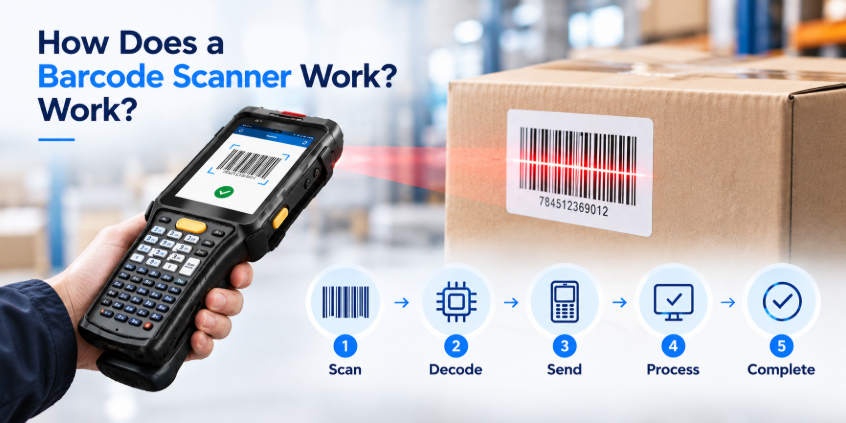
Although barcode scanners come in different designs, the basic process can be broken down into several stages:
Barcode → Light or Image Capture → Decoding → Data Processing → Software → Database
Let's look at what happens at each stage.
1. The Scanner Captures the Barcode
The first step is capturing the barcode. Traditional laser scanners use a laser beam to illuminate a barcode, while newer image-based scanners use an imaging sensor similar to a camera.
For a 1D barcode, the scanner detects the different bar widths and spacing. For a 2D barcode such as a QR Code or Data Matrix code, an imager captures the entire pattern.
This is one reason modern 2D barcode scanners are more versatile than traditional laser scanners. Instead of relying on a single horizontal line, an imaging scanner can capture and analyze a two-dimensional symbol.
For example, MUNBYN's IPDA101P uses a Zebra SE4710 2D imager that supports a wide range of 1D and 2D symbologies, including UPC/EAN, Code 128, PDF417, Data Matrix, QR Code, Aztec, and more.
2. The Scanner Converts the Image Into Data
Capturing an image is only the beginning. The scanner must determine what the pattern represents.
A barcode consists of encoded information. In a traditional 1D barcode, information is represented through the arrangement and width of bars and spaces. In a 2D barcode, information is encoded within a more complex grid or pattern.
The scanner's decoding engine analyzes the captured image and identifies the relevant elements. It then translates the pattern into a string of digital characters.
For example, a product barcode might decode into something like: 012345678901
The scanner doesn't necessarily know that this number represents a particular product. It simply reads the encoded data accurately. What happens next depends on the connected device or software.
This distinction is important when choosing a barcode scanner. Scanning capability and inventory management capability are not the same thing. A scanner reads the barcode, while software determines what the decoded information means within a business workflow.
3. The Decoder Identifies the Barcode Type
Before the scanner can return useful data, it needs to recognize the barcode's symbology. Common 1D barcode types include:
- UPC
- EAN
- Code 39
- Code 128
- Code 93
- Codabar
- Interleaved 2 of 5
Common 2D barcode types include:
- QR Code
- Data Matrix
- PDF417
- Aztec
- Micro QR Code
The more barcode types a scanner supports, the more applications it can potentially handle.
For example, a retail environment may primarily use UPC or EAN barcodes, while a warehouse or logistics operation may encounter several 1D and 2D formats across products, shipping labels, packages, and documents.
MUNBYN's current Android barcode scanners use scanning engines from manufacturers such as Zebra and Honeywell, with different models supporting different scanning capabilities. The product range includes standard 1D/2D scanning as well as long-range options.

4. The Scanner Processes the Decoded Data
Once the barcode has been decoded, the information needs to be sent somewhere.
With a traditional wired barcode scanner, the decoded characters may be transmitted directly to a connected computer or POS terminal, often appearing as if they were typed using a keyboard.
A wireless barcode scanner can transmit the data through technologies such as Bluetooth or another wireless connection.
An Android barcode scanner takes this process further. Instead of functioning only as a scanning peripheral, it can combine the scanning engine, processor, display, operating system, wireless connectivity, and business application in one handheld device.
This is one of the biggest differences between a conventional barcode scanner and an Android mobile computer.
A traditional scanner might follow this workflow:
Barcode → Scanner → Computer → Software
An Android mobile computer can work more like:
Barcode → Scanner → Android Device → App → Cloud/Database
That additional processing capability can be particularly useful for inventory and warehouse operations.
What Happens After a Barcode Is Scanned?
Scanning a barcode doesn't automatically update your inventory database. The decoded information must be processed by software that understands what the barcode represents.
For example, imagine a warehouse employee scans a product during receiving. The workflow might look like this:
- Scan the product barcode
- Decode the barcode
- Send the SKU to the inventory application
- Match the SKU with the database
- Display product information
- Update inventory quantity
- Synchronize the change
The scanner itself performs the first part of this process. The inventory application and database handle the business logic.
This is why choosing a scanner that works with your existing software is just as important as choosing a scanning engine.
For example, the MUNBYN IPDA101P runs Android 13 and supports inventory applications such as Odoo and Zoho Inventory. It also supports Wi-Fi 6, 4G, Bluetooth 5.1, and GPS, allowing the device to function as a connected mobile computer rather than simply a barcode input device.
How Different Types of Barcode Scanners Work
Not all barcode scanners use the same scanning technology. Understanding the differences can help you choose the right device for your application.
Laser Barcode Scanners
Laser scanners use a laser beam to read traditional 1D barcodes. The beam moves across the barcode, and the scanner detects changes in reflected light.
Laser technology has been widely used in retail and other applications because it can quickly read common linear barcodes.
However, traditional laser scanners generally aren't designed to read modern 2D symbols such as QR Codes or Data Matrix codes. For businesses that need to scan multiple barcode formats, an imaging-based scanner is usually more versatile.
CCD Barcode Scanners
CCD, or Charge-Coupled Device, scanners use an array of light-sensitive elements to capture the barcode.
Instead of sweeping a laser across the barcode, a CCD scanner captures the reflected pattern and analyzes it.
CCD technology can be effective for close-range barcode scanning, although modern imaging technology has become increasingly common in business scanners.
2D Imager Barcode Scanners
2D imagers use an imaging sensor to capture a picture of the barcode and decode it using software.
This technology can read both 1D and 2D barcodes, making it a popular choice for modern retail, inventory, logistics, and warehouse applications.
For example, the MUNBYN IPDA082P uses a Honeywell HS7 scan engine and is designed to scan 1D, 2D, and damaged barcodes. It runs Android 12 and supports inventory applications including inFlow, Zoho, Sortly, Odoo, and Orcascan.
This type of scanner can be especially useful when a business handles different barcode formats rather than relying on one standardized label.
How Does an Android Barcode Scanner Work?
An Android barcode scanner combines a barcode scanning engine with an Android-based mobile computer.
Instead of connecting a basic scanner to a separate computer, the scanning engine is integrated into the handheld device.
A typical Android scanner includes:
- Barcode scanning engine
- Android operating system
- Processor
- Touchscreen
- RAM and storage
- Wi-Fi
- Bluetooth
- Battery
- Mobile connectivity on supported models
- Business applications
When an employee scans a barcode, the device can immediately display, process, store, or transmit the result.
This makes Android barcode scanners particularly useful for warehouse inventory, retail operations, logistics, order picking, receiving, and field service.

Why Barcode Scanner Speed and Accuracy Matter
A barcode scanner isn't simply judged by whether it can read a barcode. In a business environment, scanning performance can affect productivity.
Consider a warehouse employee who scans hundreds or thousands of items during a shift. Small delays become significant when repeated hundreds of times. Important performance factors include:
Scan Speed
A fast scanning engine reduces the time between presenting a barcode and receiving a result.
Decode Accuracy
The scanner needs to correctly interpret the barcode, including labels that may be small, damaged, poorly printed, or difficult to position.
Scanning Range
Standard scanners are generally suitable for close and medium-distance scanning, while long-range models are designed for applications such as warehouse racks and pallets.
MUNBYN's long-range models use scanning engines designed for near-, mid-, and far-range scanning. The IPDA101P-LR, for example, is specified for scanning distances of up to 10 meters under suitable conditions.
Ergonomics
When a scanner is used continuously, its weight, grip, trigger position, and overall design can affect worker comfort.
This is one reason handheld Android scanners with dedicated scan triggers or pistol grips can be useful for repetitive warehouse scanning.
Barcode Scanner vs. Android Mobile Computer
A traditional barcode scanner and an Android mobile computer with an integrated scanner serve different needs.
| Feature | Traditional Barcode Scanner | Android Mobile Computer |
|---|---|---|
| Barcode scanning | Yes | Yes |
| Built-in display | Usually no | Yes |
| Operating system | No | Android |
| Business apps | Requires host | Can run directly |
| Wi-Fi | Depends on model | Common |
| Mobile connectivity | Limited | Available on supported models |
| Inventory management | Requires host software | Can run compatible apps |
| Mobility | Depends on connection | Designed for mobile workflows |
| Best for | POS/basic scanning | Warehouse/inventory/logistics |
For a simple checkout station, a traditional USB or Bluetooth scanner may be all you need. For employees who need to scan, view information, make decisions, and update inventory while moving through a warehouse, an Android mobile computer can provide a more complete solution.
MUNBYN scanner collection includes Android mobile computers with different operating systems, scan engines, battery capacities, and form factors, allowing businesses to choose a configuration based on their workflow.
How to Choose the Right Barcode Scanner
Now that you understand how a barcode scanner works, the next question is which type is right for your business. Start with these factors:
1. What barcode types do you need to scan?
If your business only uses UPC or EAN labels, a basic 1D scanner may be sufficient. If you need QR Codes, Data Matrix, PDF417, or other 2D symbols, choose a 2D imaging scanner.
2. Where will you use the scanner?
Retail checkout, warehouse inventory, manufacturing, logistics, and field operations can have very different requirements.
3. How far away are the barcodes?
For standard close-range scanning, a conventional imager may be enough. For high racks and pallets, consider a long-range scanner.
4. Do you need a standalone device?
If employees only need to transfer barcode data to a computer, a conventional scanner may be sufficient. If they need to scan and immediately interact with inventory software, an Android mobile computer may be a better fit.
5. What level of durability do you need?
Warehouse and industrial environments may require features such as drop resistance, IP-rated protection, glove-friendly touchscreens, and wider operating temperature ranges.
6. What software do you use?
Always check compatibility with your POS, inventory management, warehouse management, or ERP software before purchasing.
Final Thoughts: How a Barcode Scanner Works
So, how does a barcode scanner work? The process is relatively straightforward:
- Capture the barcode
- Decode the pattern
- Process the data
- Send the information to software
- Update the database
The technology behind barcode scanning has evolved considerably from basic laser scanners. Today's 2D imaging and Android barcode scanners can combine fast scanning with mobile computing, wireless connectivity, and business applications in a single handheld device.
For simple point-of-sale scanning, a traditional scanner may be sufficient. But for warehouse inventory, logistics, retail operations, and other mobile workflows, an Android barcode scanner can provide the scanning and computing capabilities employees need in one device. (Use the limited-time discount code "MYSEO6" at checkout to enjoy an extra 6% off.)
Share:
How to Elevate Your Handmade Packaging with MUNBYN & Michaels
MUNBYN IMC22 Money Counter vs. IMC09: What’s New in the Upgraded Model?