


 United States
 Best Seller
 Label Printers
 All PDAs
 All Tablets
 All Thermal Labels
 Printer Accessories
Managing inventory accurately becomes increasingly difficult as product quantities, SKUs, storage locations, and customer orders grow. Manual data entry can slow down daily operations and create mistakes that affect stock levels, order fulfillment, and customer service.
A barcode scanner for inventory management provides a faster way to capture product information and keep inventory records updated. Instead of typing SKU numbers or product details manually, warehouse and retail employees can scan a barcode and send the data directly to an inventory management system. In this guide, we'll look at how barcode scanners improve accuracy throughout the inventory workflow—from receiving and stock counting to picking, packing, and order fulfillment.
How Does a Barcode Scanner Improve Inventory Accuracy?
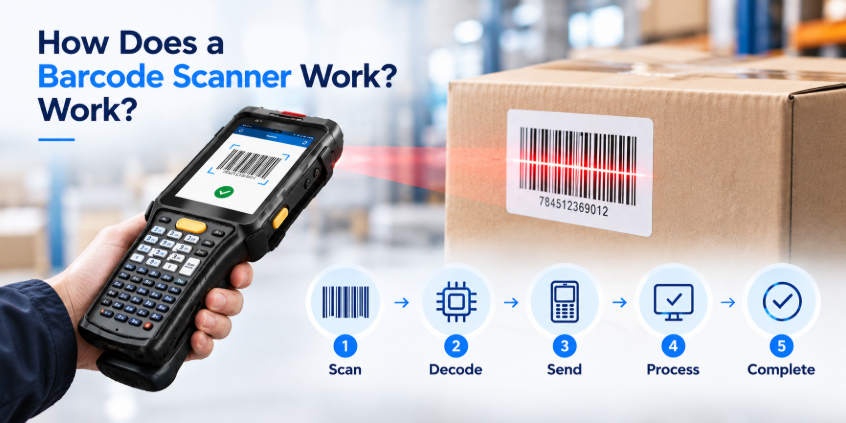
At its simplest, a barcode scanner converts a printed or digital barcode into usable data. When a worker scans a product, the scanner captures the barcode and transfers the information to connected inventory software.
This eliminates many opportunities for errors caused by manually entering product numbers, quantities, or SKUs.
For example, a warehouse employee receiving 50 products can scan each item's barcode instead of manually entering its SKU. The inventory system can then record the products and update the corresponding stock quantity.
A modern Android handheld scanner can make this process even more efficient because employees can run inventory applications directly on the scanning device. For example, the MUNBYN IPDA101P Android barcode scanner uses a Zebra SE4710 scanning engine and supports inventory applications such as Odoo and Zoho Inventory. Understanding how barcode scanners capture and process data? See our guide on how a barcode scanner works.
1. Receiving Inventory
Inventory accuracy starts when products arrive. During receiving, employees need to verify that the products delivered match the purchase order or receiving record. Manually checking and entering every SKU can take time and increase the risk of entering the wrong product number.
With a barcode scanner, workers can:
- Scan each product as it arrives
- Verify SKU and product information
- Record received quantities
- Identify missing or incorrect items
- Update inventory records immediately
This creates a more reliable receiving process and reduces the possibility of incorrect stock levels entering the system from the beginning. For businesses handling hundreds or thousands of incoming items, faster barcode scanning can make receiving considerably easier to manage.
2. Stock Counting and Cycle Counting
Physical inventory counts are another area where barcode scanning can significantly improve accuracy.
Instead of writing down SKU numbers and quantities on paper, employees can scan products as they move through a storage area. The inventory system can then compare the scanned information with the expected stock level. Barcode scanners are especially useful for cycle counting, where businesses regularly count selected products instead of performing a complete inventory count all at once.
A typical cycle counting workflow looks like this:
Locate → Scan → Count → Verify → Update
The scanner helps employees identify the correct product and record the quantity without repeatedly typing product information. This can reduce counting mistakes while making cycle counts easier to repeat on a regular schedule.
3. Stock Transfers Between Locations
Inventory often moves between warehouses, storage areas, retail stores, or different bins within the same facility.
Without barcode scanning, employees may need to manually record which products are leaving one location and where they are going. This creates opportunities for incorrect SKU or location information. A barcode scanner for inventory management can simplify the process:
- Scan the product.
- Scan the source location.
- Enter or confirm the quantity.
- Scan the destination location.
- Confirm the transfer.
The result is a clearer record of where inventory is located. For businesses with multiple storage locations, accurate transfer records are particularly important because inventory can appear available in the system while physically sitting somewhere else.
4. Picking the Right Products
Picking errors can directly affect order accuracy and customer satisfaction. When employees pick products for an order, they need to confirm both the product and quantity. A barcode scanner provides an additional verification step.
For example, the worker can scan the barcode on the product before placing it into the order container. The inventory system can check whether the scanned item matches the order.
If the wrong product is scanned, the system can alert the worker before the order moves to the next stage. This simple scan-and-verify process can help reduce:
- Wrong SKU selections
- Incorrect quantities
- Missed items
- Picking mistakes caused by similar-looking products
For warehouses processing a large number of orders, these small improvements can make a meaningful difference.
5. Packing and Order Fulfillment
Barcode scanning can also continue after picking. During packing, employees can scan products again to confirm that the correct items are inside the package. Depending on the software and workflow, they may also scan the order or shipping label to associate the package with the correct customer order.
This creates another checkpoint before the order leaves the warehouse. A typical workflow can be:
Pick → Scan → Verify → Pack → Scan → Ship
Using barcode scanning at multiple points helps create traceability throughout the fulfillment process instead of relying entirely on manual checks.
6. Real-Time Inventory Updates
One of the biggest advantages of using a barcode scanner for inventory management is the ability to update inventory information as work happens.
When a product is received, moved, picked, or shipped, the corresponding scan can be sent to the inventory system. This helps keep stock records closer to the actual physical inventory.
Real-time or near-real-time updates can help employees answer important questions more confidently:
- How many units are currently available?
- Where is a specific product stored?
- Has an order already been picked?
- Was a product received?
- Has inventory been transferred?
- Which items need to be replenished?
The quality of these updates depends on the inventory software, network connection, and workflow configuration, but barcode scanning provides the data capture needed to support the process.
7. Reduce Manual Data Entry
Manual data entry is one of the most common sources of avoidable inventory errors. Typing a long SKU, product number, or barcode digit by digit creates opportunities for:
- Transposed numbers
- Missing digits
- Incorrect quantities
- Duplicate entries
- Incorrect product selection
Barcode scanning replaces much of this repetitive typing with automated data capture. For employees who scan hundreds of products during a shift, reducing manual entry can also make the workflow more consistent and less repetitive.
Choosing a Barcode Scanner for Inventory Management

Not every barcode scanner is designed for intensive inventory workflows. When choosing a device, consider the environment and the tasks employees perform every day.
Scanning Performance
Look for a scanner capable of reading the barcode types used by your business, including common 1D and 2D formats.
Software Compatibility
The scanner should work with your inventory, warehouse, or order management software. Android-based devices can be particularly flexible because they can run compatible business applications directly.
Battery Life
Warehouse employees may use scanners throughout an entire shift. A long-lasting battery can reduce interruptions and charging downtime.
Durability
For warehouse and industrial environments, a rugged scanner can be useful because devices may be exposed to drops, dust, moisture, and frequent handling.
Ergonomics
If employees scan products continuously, the scanner should be comfortable to hold and easy to operate. A trigger-style design can be useful for high-volume scanning.
Best Barcode Scanner for Inventory Management

The best barcode scanner for inventory management should do more than simply read barcodes. For daily warehouse and retail operations, look for a device that combines fast scanning, reliable performance, long battery life, durable construction, and compatibility with your inventory software.
For businesses that need a mobile solution, an Android handheld barcode scanner can be especially useful. Instead of connecting a basic scanner to a separate computer, an Android mobile computer allows employees to scan products, access inventory applications, and update stock information from the same device.
For example, the MUNBYN IPDA101P Android Barcode Scanner is designed for inventory, warehouse, and retail workflows. It features a Zebra SE4710 scan engine for fast barcode capture and supports Android applications, making it suitable for tasks such as receiving inventory, stock counting, picking, and order fulfillment. (Use the limited-time discount code "MYSEO6" at checkout to enjoy an extra 6% off.)
Build a More Accurate Inventory Workflow
Inventory accuracy is not determined by a single stock count. It depends on the accuracy of every inventory movement—from receiving products to storing, transferring, picking, packing, and shipping them.
A barcode scanner for inventory management helps connect these steps by providing a consistent way to capture product and location data. By reducing manual data entry and adding scan-based verification, businesses can create a more reliable inventory workflow.
For warehouses, retailers, and other businesses that handle inventory every day, an Android handheld scanner can combine barcode scanning with mobile inventory applications in a single device.
Share:
How Thoughtful Branding Helped Me Grow My Small Business